

[L]PHP allows you to send e-mails directly from a script.
--------------------------------------------------------------------------------
The PHP mail() Function
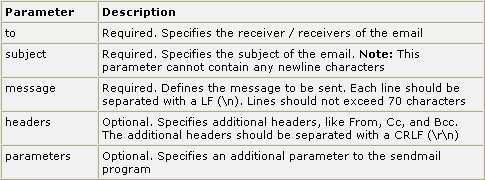
The PHP mail() function is used to send emails from inside a script.
Syntax
 --------------------------------------------------------------------------------
PHP Simple E-Mail
The simplest way to send an email with PHP is to send a text email.
In the example below we first declare the variables ($to, $subject, $message, $from, $headers), then we use the variables in the mail() function to send an e-mail:
--------------------------------------------------------------------------------
PHP Mail Form
With PHP, you can create a feedback-form on your website. The example below sends a text message to a specified e-mail address:
This is how the example above works:
- First, check if the email input field is filled out
- If it is not set (like when the page is first visited); output the HTML form
- If it is set (after the form is filled out); send the email from the form
- When submit is pressed after the form is filled out, the page reloads, sees that the email input is set, and sends the email[/L]
--------------------------------------------------------------------------------
PHP Simple E-Mail
The simplest way to send an email with PHP is to send a text email.
In the example below we first declare the variables ($to, $subject, $message, $from, $headers), then we use the variables in the mail() function to send an e-mail:
--------------------------------------------------------------------------------
PHP Mail Form
With PHP, you can create a feedback-form on your website. The example below sends a text message to a specified e-mail address:
This is how the example above works:
- First, check if the email input field is filled out
- If it is not set (like when the page is first visited); output the HTML form
- If it is set (after the form is filled out); send the email from the form
- When submit is pressed after the form is filled out, the page reloads, sees that the email input is set, and sends the email[/L]
mail(to,subject,message,headers,parameters)Note: For the mail functions to be available, PHP requires an installed and working email system. The program to be used is defined by the configuration settings in the php.ini file.<?php
$to = "someone@example.com";
$subject = "Test mail";
$message = "Hello! This is a simple email message.";
$from = "someonelse@example.com";
$headers = "From: $from";
mail($to,$subject,$message,$headers);
echo "Mail Sent.";
?> <html>
<body>
<?php
if (isset($_REQUEST['email']))
//if "email" is filled out, send email
{
//send email
$email = $_REQUEST['email'] ;
$subject = $_REQUEST['subject'] ;
$message = $_REQUEST['message'] ;
mail( "someone@example.com", "Subject: $subject",
$message, "From: $email" );
echo "Thank you for using our mail form";
}
else
//if "email" is not filled out, display the form
{
echo "<form method='post' action='mailform.php'>
Email: <input name='email' type='text' /><br />
Subject: <input name='subject' type='text' /><br />
Message:<br />
<textarea name='message' rows='15' cols='40'>
</textarea><br />
<input type='submit' />
</form>";
}
?>
</body>
</html>